Darktrace
This article describes the steps to configure syslog forwarding for Darktrace.
Prerequisites
-
Configure Darktrace to send logs.
-
Ensure you are a Darktrace Administrator with access to the User Interface.
To configure syslog forwarding for Darktrace:
-
Log in to the Darktrace interface.
-
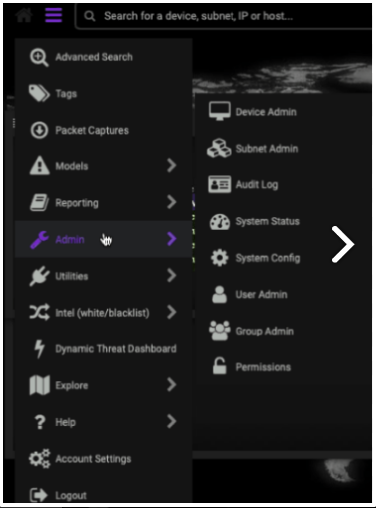
Expand the top left menu and select Admin. A second menu appears.
-
Select the System Config page.
-
In the Alerting section, click Verify Alert Settings.
-
Set the following parameters:
-
CEF Syslog Alerts as True.
-
The syslog server to the IP address of the DNIF Adapter.
-
Set a unique port.
-
CEF Syslog TCP Alerts as True.

-
-
Darktrace will automatically save your changes.
-
In the Alerting section, click Verify Alert Settings.
-
You will view 1 Alert Sent. IMAP settings are valid message, on validating.