IIS
Internet Information Services (IIS) is a flexible, general-purpose web server from Microsoft that runs on Windows systems to serve requested HTML pages or files.
Supports integration with 32 bit and 64 bit Windows machines.
Integration of IIS Webserver Logs via NXLog with DNIF
To configure NXLog to send IIS Webserver access logs to DNIF Adapter.
If you want to integrate IIS Webserver access logs as well as Windows event logs, refer Integrating Windows Event Logs
Download and install Nxlog
-
Download and install the latest version of NXLog on the Windows machine from which the logs need to be collected.
-
After installation, locate the nxlog.conf file in the C:\Program Files (x86)\nxlog\conf folder.
In 32 bit Windows machines, look in the C:\Program Files\nxlog\conf folder,

- Open the nxlog.conf file using a text editor. Replace the entire configuration by copy-pasting the text given for your Windows version.
Windows x32 bit OS
#============ Define ROOT here ===================define ROOT C:\Program Files\nxlog#define ROOT C:\Program Files (x86)\nxlog#============ NXLog Machine Log info =============Moduledir %ROOT%\modulesCacheDir %ROOT%\dataPidfile %ROOT%\data\nxlog.pidSpoolDir %ROOT%\dataLogFile %ROOT%\data\nxlog.log#=========== For IIS - default logs =============# For Following field sequence (ie : default)# Fields: date time s-sitename s-computername s-ip cs-method cs-uri-stem cs-uri-query s-port cs-username c-ip cs-version cs(User-Agent) cs(Cookie) cs(Referer) cs-host sc-status sc-substatus sc-win32-status sc-bytes cs-bytes time-taken<Extension w3c>Module xm_csvFields $date, $time, $SiteName, $SystemName, $DstIP, $HTTPMethod, $BaseURL, $URIQuery, $DstPort, $UserName, $SourceIP, $Cs-version, $UserAgent, $CS-Cookie, $HTTPReferer, $SourceHost, $HTTPRetCode, $Substatus, $Win32Status, $RXLen, $TXLen, $Time-TakenFieldTypes string, string, string, string, string, string, string, string, string, string, string, string, string, string, string, string, string, string, string, string, string, stringDelimiter ' 'QuoteChar '"'EscapeControl FALSEUndefValue -</Extension><Input IISin>Module im_fileFile 'C:\WINDOWS\system32\LogFiles\W3SVC1\ex*' ##path of log fileReadFromLast TRUEExec if $raw_event =~ /^#/ drop(); \else \{\w3c->parse_csv(); \$EventTime = parsedate($date + " " + $time); \}</Input><Output IISout>Module om_udpExec $raw_event = to_json();Host DNIF-Adapter-IPPort 514</Output><Route 1>Path IISin => IISout</Route>
Windows x64 bit OS
#============ Define ROOT here ===================#define ROOT C:\Program Files\nxlogdefine ROOT C:\Program Files (x64)\nxlog#============ NXLog Machine Log info =============Moduledir %ROOT%\modulesCacheDir %ROOT%\dataPidfile %ROOT%\data\nxlog.pidSpoolDir %ROOT%\dataLogFile %ROOT%\data\nxlog.log#=========== For IIS - default logs =============# For Following field sequence (ie : default)# Fields: date time s-sitename s-computername s-ip cs-method cs-uri-stem cs-uri-query s-port cs-username c-ip cs-version cs(User-Agent) cs(Cookie) cs(Referer) cs-host sc-status sc-substatus sc-win32-status sc-bytes cs-bytes time-taken<Extension w3c>Module xm_csvFields $date, $time, $SiteName, $SystemName, $DstIP, $HTTPMethod, $BaseURL, $URIQuery, $DstPort, $UserName, $SourceIP, $Cs-version, $UserAgent, $CS-Cookie, $HTTPReferer, $SourceHost, $HTTPRetCode, $Substatus, $Win32Status, $RXLen, $TXLen, $Time-TakenFieldTypes string, string, string, string, string, string, string, string, string, string, string, string, string, string, string, string, string, string, string, string, string, stringDelimiter ' 'QuoteChar '"'EscapeControl FALSEUndefValue -</Extension><Input IISin>Module im_fileFile 'C:\WINDOWS\system32\LogFiles\W3SVC1\ex*' ##path of log fileReadFromLast TRUEExec if $raw_event =~ /^#/ drop(); \else \{\w3c->parse_csv(); \$EventTime = parsedate($date + " " + $time); \}</Input><Output IISout>Module om_udpExec $raw_event = to_json();Host DNIF-Adapter-IPPort 514</Output><Route 1>Path IISin => IISout</Route>
-
Restart NXLog
-
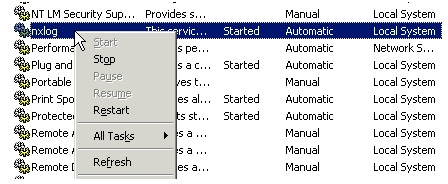
To apply changes made on nxlog.conf, you have to restart the service again. Go to Control Panel > Services and locate the nxlog service.
-
Right click on nxlog and click restart
IIS Webserver access logs are now streamed to DNIF.