Shopify Connector
Shopify connector reads logs/events that have occurred in your Shopify account. Please read what kind of events can be captured by the connector here.
Pre-requisites
-
Your Shopify URL
-
Shopify Access Token with the required permissions
Creating Shopify Access Token with the required permissions
-
Sign in to the Shopify Store and click Apps.
-
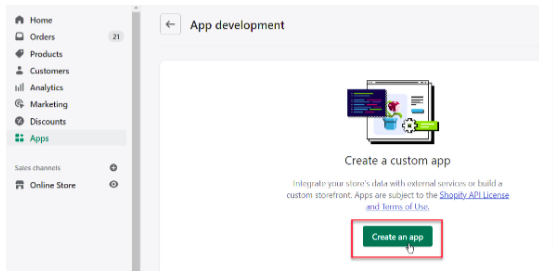
Create a new App
-
Name your app and assign an app developer and click Create an app.
-
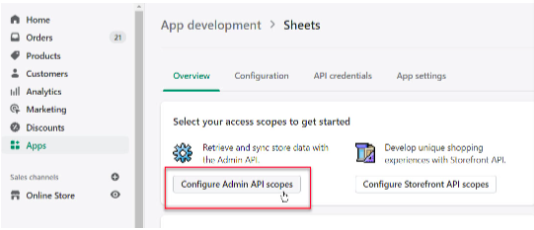
Now on the app overview screen, Click Configure Admin API scopes.
-
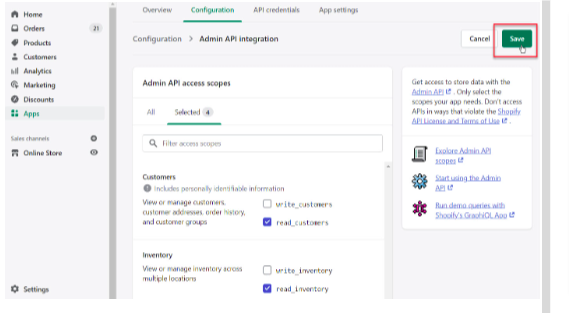
Select the read permissions of all the necessary scopes to get your audit events for products, orders, customers, inventory, etc. Click Save.
-
Go to the API credentials tab and click Install app. After the installation, you should now see your Admin API access token on the screen.
Configurations
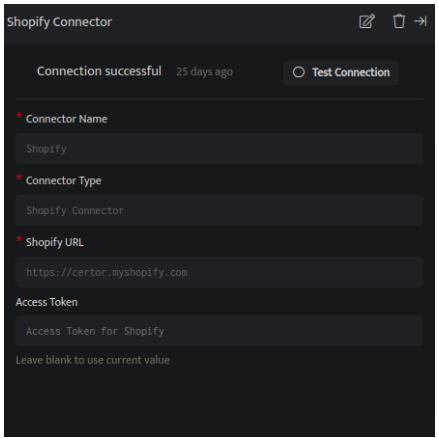
The following are the configurations to forward Shopify Connector logs to DNIF.
| Field Name | Description |
|---|---|
| Connector Name | Enter a name for the connector |
| Connector Type | Enter Shopify Connector |
| Shopify URL | Enter the URL of your Shopify Store |
| Access Token | Enter the token generated above |
- Click Save, to forward Shopify Connector logs to DNIF.