1Password Connector
1Password connector utilizes the pull method to retrieve Dropbox Logs through the 1Password events API.
Prerequisites
-
1Password Account.
-
Base URL
-
Log Types
-
Access Token
How to derive the prerequisites?
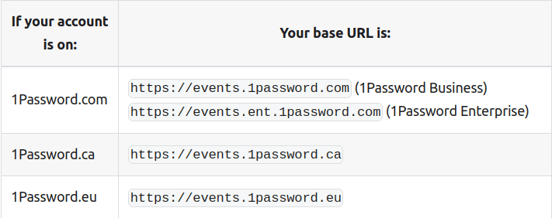
- Get your Base URL by referring to the Servers section in the 1Password Docs.
- Sign in to your 1Password account using the following link https://start.1password.com/signin

-
Click Integration in the sidebar.

-
Click Directory at the top of the page.
- Scroll down to the Events Reporting section then click Other

-
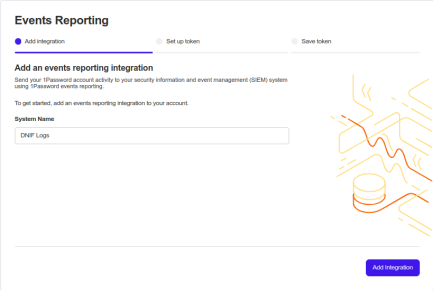
Enter a System Name for the integration, then click Add Integration.

-
Enter a name for the token and choose token expiration.
-
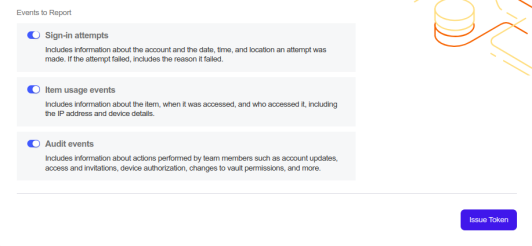
Select the event types your token will have access to and click the Issue Token to generate the access token key.

-
Copy and securely store the token. Click Save in 1password and choose which vault to save to.
Configurations
-
The following are the configurations to forward 1Password Connector logs to DNIF.

| Field | Description |
|---|---|
| Connector Name | Enter a name for the connector |
| Base URL | Select the Base URL for 1Password API |
| Log Types | Select the log types |
| Access Token | Enter the Access Token |
The following optional configurations can be done based on requirement
| Field | Description |
|---|---|
| Set the loglevel 0: DEBUG 1: INFO 4: WARNING 5: ERROR 6: CRITICAL | |
| Number of Threads | Number of threads to publish logs |
| Size limit | Size limit for creating bunching of logs to be sent |
| Wait Time | Max time to wait for log bunching in second |