Auth0 Connector
Select the Settings tab
Auth0 connector utilizes the pull method to retrieve Auth0 Logs through the Auth0 Management API.
Prerequisites
-
Auth0 Account
-
Domain
-
Client ID
-
Client Secret
-
API Identifier(API Audience)
How to derive the prerequisites?
- Login to Auth0 Dashboard

- In the sidebar, click Applications under Applications

- Click Create Application

- Fill out the application form, enter the Application Name

-
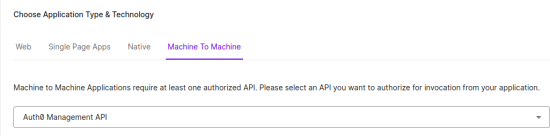
Choose the Application type as Machine To Machine and select Auth0 Management API as the API of the application.
-
After selecting the API, below in the permissions section enable read:logs and read:logs_users permissions and then click Continue.

-
Select the Settings tab

-
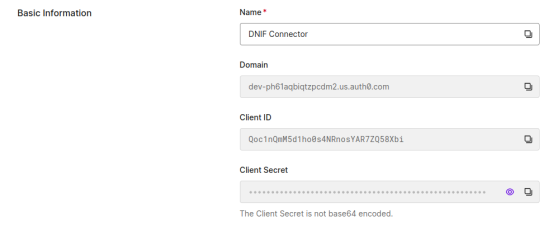
Scroll down to see the credentials, copy the Domain, Client ID, Client Secret and store them securely.
Configurations
The following are the configurations to forward Auth0 Connector logs to DNIF.

| Field | Description |
|---|---|
| Connector Name | Enter a name for the connector |
| Domain | Enter your Auth0 organization Domain |
| Client ID | Enter your Auth0 application Client ID |
| Client Secret | Enter your Auth0 application Client Secret |
| API Identifier | Enter Auth0 API Identifier token |
The following optional configurations can be done based on requirement.
| Field | Description |
|---|---|
| Log Level | Set the loglevel 0: DEBUG 1: INFO 4: WARNING 5: ERROR 6: CRITICAL |
| Number of Threads | Number of threads to publish logs |
| Size limit | Size limit for creating bunching of logs to be sent |
| Wait Time | Max time to wait for log bunching in seconds |