MS SQL
Microsoft SQL Server is a relational database management system developed by Microsoft. As a database server, it is a software product with the primary function of storing and retrieving data as requested by other software applications which may run either on the same computer or on another computer across a network.
This document has been written for integration with 32 bit and 64 bit Windows machines.
Integration of Microsoft SQL Logs via NXLog with DNIF
To configure NXLog to send Microsoft SQL logs to DNIF Adapter.
If you want to integrate Apache WAMP access logs as well as Windows event logs, please refer our help guide: Integrating Windows Event Logs..
Download and Install Nxlog
Download and install the latest version of NXLog on the Windows machine from which the logs need to be collected.
After installation, locate the nxlog.conf file in the C:Program Files (x86)nxlogconf folder.
In 32 bit Windows machines, look in the C:Program Filesnxlogconf folder,

- Open the nxlog.conf file using a text editor. Replace the entire configuration by copy-pasting the text given for your Windows version.
Windows x32 bit OS
#============ Define ROOT here ===================
define ROOT C:Program Filesnxlog
#define ROOT C:Program Files (x86)nxlog
#============ NXLog Machine Log info =============
Moduledir %ROOT%modules
CacheDir %ROOT%data
Pidfile %ROOT%datanxlog.pid
SpoolDir %ROOT%data
LogFile %ROOT%datanxlog.log

##############For mssqldblogs###############

<Extension syslog>
Module xm_syslog
</Extension>

<Extension _charconv>
Module xm_charconv
AutodetectCharsets UTF-16LE, UTF-16BE, UTF-32LE, UTF-32BE, UTF-8, euc-jp, iso8859-2
</Extension>

<Input mssql_db>
Module im_file
File 'C:Program FilesMicrosoft SQL ServerMSSQL10_50.SQLEXPRESSMSSQLLogERRORLOG*' ##path of log file
SavePos TRUE
Recursive TRUE
PollInterval 1
Exec convert_fields("AUTO","utf-8"); to_syslog_bsd();
</Input>

<Input mssql_db1>
Module im_file
File 'C:Program FilesMicrosoft SQL ServerMSSQL10_50.SQLEXPRESSMSSQLLogSQLAGENT*' ##path of log file
SavePos TRUE
Recursive TRUE
PollInterval 1
Exec convert_fields("AUTO","utf-8"); to_syslog_bsd();
</Input>

<Output mssql_db_out>
Module om_udp
Host DNIF-Adapter-IP
Port 514
</Output>

<Route 1>
Path mssql_db, mssql_db1 => mssql_db_out
</Route>
'}```

### **Windows x64 bit OS**

```{'
#============ Define ROOT here ===================
#define ROOT C:Program Filesnxlog
define ROOT C:Program Files (x64)nxlog
#============ NXLog Machine Log info =============
Moduledir %ROOT%modules
CacheDir %ROOT%data
Pidfile %ROOT%datanxlog.pid
SpoolDir %ROOT%data
LogFile %ROOT%datanxlog.log

##############For mssqldblogs###############

<Extension syslog>
Module xm_syslog
</Extension>

<Extension _charconv>
Module xm_charconv
AutodetectCharsets UTF-16LE, UTF-16BE, UTF-32LE, UTF-32BE, UTF-8, euc-jp, iso8859-2
</Extension>

<Input mssql_db>
Module im_file
File 'C:Program FilesMicrosoft SQL ServerMSSQL10_50.SQLEXPRESSMSSQLLogERRORLOG*' ##path of log file
SavePos TRUE
Recursive TRUE
PollInterval 1
Exec convert_fields("AUTO","utf-8"); to_syslog_bsd();
</Input>

<Input mssql_db1>
Module im_file
File 'C:Program FilesMicrosoft SQL ServerMSSQL10_50.SQLEXPRESSMSSQLLogSQLAGENT*' ##path of log file
SavePos TRUE
Recursive TRUE
PollInterval 1
Exec convert_fields("AUTO","utf-8"); to_syslog_bsd();
</Input>

<Output mssql_db_out>
Module om_udp
Host DNIF-Adapter-IP
Port 514
</Output>

<Route 1>
Path mssql_db, mssql_db1 => mssql_db_out
</Route>
'}
- Restart NXLog.
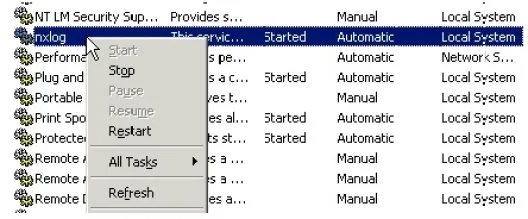
- To apply changes made on nxlog.conf, you have to restart the service again. Go to Control Panel > Services and locate the nxlog service.
Right click on nxlog and restart
Microsoft SQL logs are now streamed to DNIF.